3.26 · Guides
The admin
The optional hinoki.admin module gives staff a list, search, create, edit, bulk delete and a dashboard for your models, with the same access policies and CSRF protection as the rest of the app. It is included in the framework package; nothing is mounted unless you ask, and importing it never touches a database.
The following excerpt follows the Blog admin module. PostAdmin names its model once and configures how it is shown; build_admin() creates the Admin (with the admin's own users, so there is no sign-in code) and registers the model admins; the app includes the admin under a Mount. The snippet shows the relevant imports and function context; consult the linked module for the complete version.
from blog.models import Post, User
from hinoki import Mount
from hinoki.admin import Admin, ModelAdmin, Tone, action


class PostAdmin(ModelAdmin, model=Post):
    columns = ("title", "published", "author_id", "created_at")
    readonly = ("created_at",)
    badges = {"published": {True: ("Published", Tone.OK), False: ("Draft", Tone.WARN)}}
    tabs = ("published",)  # one tab for each badge: Published | Draft
    fieldsets = {"Organization": ("author_id", "published")}

    @action(confirm="Publish the selected posts?")
    async def publish(self, posts, principal):
        await Post.filter(id__in=[p.id for p in posts]).aupdate({"published": True})


def build_admin(theme: str = "studio") -> Admin:
    site = Admin(theme=theme, site="Blog Studio", per_page=8)
    site.register(PostAdmin)  # a customised admin ...
    site.register(User)  # ... or a model, for the default admin
    return site


app = Hinoki(settings=BlogSettings.load(), include=[Mount("/admin", build_admin())])
A model admin names its model with the class keyword model= (ModelAdmin[Post] still works; naming two different models is a RegistrationError). site.register(...) takes a ModelAdmin class, which names its model, or a model class, which gets the default admin; it returns what it was given, so @site.register also works as a class decorator. When the site already exists where the class is written, @site.admin(Post) registers a class that need not repeat model=Post. The site signs its forms with admin.secret from the app's settings (PREFIX_ADMIN__SECRET, at least 32 bytes); Admin(secret=...) overrides it for one site, and an admin with neither stops the app at startup. The slug of a model is its table name with dashes, or the class attribute slug = "posts". site.register(Post, PostAdmin, slug="posts") remains available.
Short forms: a badge is Badge(label, tone, icon) or the tuple (label, tone) / (label, tone, icon); tabs = ("published",) makes one tab for each value that badges names for that column, labelled with the badge; fieldsets may be a dictionary of title to field names. Tone (NEUTRAL, ACCENT, OK, WARN, DANGER, INFO) is the color role of badges, stats and events; the matching strings are still accepted.
search names the columns the list's search box and the global search look in: a row matches when any of them contains the typed text, compared case-insensitively as text (so a number or date column matches on its printed form). Without search the box looks in the first three text columns that the list shows (never in a column it does not show, such as an excluded token). Naming an excluded column in search is refused at registration, because which rows match would reveal its value.
Row visibility, field assignment and which columns are shown are decided in the admin class; hooks (queryset, can, display, stats, check, save, remove) override what you need. queryset(principal) is the primary way to decide which rows a caller sees: counts and page numbers come from it. can(principal, "view", row) is also applied row by row to what a list page or the dashboard fetched, so a denied row is not shown; it can only trim the page already fetched, so a page may hold fewer rows than per_page and the totals still count the queryset. Mass assignment, excluded columns and out-of-scope rows are refused by the framework, and every form carries a signed CSRF token bound to the signed-in subject.
Datetime fields in the admin use the including app's settings.timezone (UTC when the app has no built-in settings). Forms display stored instants in that timezone and interpret edited datetime-local values there before saving them as UTC-aware datetimes. Times that do not exist or occur twice during a daylight-saving clock change are rejected for correction. API datetimes with offsets remain absolute instants; utc_today() continues to use UTC.
Who may sign in
Admin() with no access= uses the admin's own users: accounts, a sign-in page, sessions and per-model permissions, kept in three tables of your database. Nothing is created until you ask for it, and importing Hinoki never touches a database.
Register the tables as an app and apply their migration once:
uv run hinoki app add admin \
    --models hinoki.admin.users.models --migrations hinoki.admin.users.migrations
uv run hinoki migrations apply admin
The admin also needs its signing secret: admin.secret in the settings (PREFIX_ADMIN__SECRET, at least 32 bytes). The sessions and passwords follow admin.session_hours (12), admin.idle_minutes (120) and admin.min_password_length (12).
site = Admin(site="Blog Studio")  # its own users; nothing else to pass
site.register(PostAdmin)
site.register(User)
app = Hinoki(settings=BlogSettings.load(), include=[Mount("/admin", site)])
- Pages.
GET/POST /login,POST /logoutandGET/POST /passwordlive under the admin's prefix. A visitor without a session is redirected (303) to the sign-in page. Every form carries a CSRF token; the sign-in form's token proves the server issued it and must match theSameSite=Strictcookie and theOrigincheck, and the others are bound to the signed-in user. - Passwords are Argon2id hashes. Unknown usernames cost the same work as a wrong password and get the same answer, and an inactive user cannot sign in. Changing a password ends every session of the user and gives the current browser a new one.
- Sessions are a random token in an
HttpOnly,SameSite=Laxcookie scoped to the admin's path (Secureon HTTPS, which behind a TLS-terminating proxy needsserver.trusted_proxiesso the forwarded scheme is believed, or wheneverAdmin(secure_cookies=True), which is the safer choice there and also names the cookies__Secure-hinoki_admin_sessionand__Secure-hinoki_csrf, so a browser refuses to store them over plain HTTP and a sibling site cannot plant them; the__Host-prefix is not used because it requiresPath=/and these cookies are scoped to the admin's path; switchingsecure_cookiessigns everyone out once); the database keeps only the token's SHA-256, so a copy of the table cannot be replayed. A session ends aftersession_hours, afteridle_minuteswithout a request, on sign-out, on a password change (also one made while a sign-in was in flight) and when its user is deactivated; reactivating a user never brings an old session back. Deactivate withAdminAccounts.set_active(user, False), which also ends the sessions. A new sign-in never reuses a token. - Permissions are per model and per action (
view,add,change,delete; a bulk action needschange), stored as grants. A superuser holds every grant. The namesview,add,changeanddeleteare reserved: a bulk action cannot take one. The check is applied around each model admin'scan, so an override ofcancan narrow what a grant allows but never widen it. A user without a grant for a model does not see it in the sidebar and gets404for its pages. - Rate limit. The sign-in and password routes are protected by
LoginWindow, a fixed window per client address (10 attempts a minute; an IPv6 address counts by its /64) kept in one worker's memory, so each worker counts on its own: it is a brake, not a defence, and the cost of hashing is the main one. The table holds at most 10,000 addresses and drops the oldest. Requests with no known address share one window ten times as large; configureserver.trusted_proxiesso the real client address is known. These routes hold no database connection while a password is hashed. For a limit shared by every worker and host, passDatabaseLoginWindow(fromhinoki.admin.users.limits), which keeps the same window in thehinoki_admin_login_windowstable:Admin(users=AdminAccounts(login_limit=DatabaseLoginWindow())). Apply the admin users' migrations first (0002-login-windowsadds the table); clients are stored as SHA-256 digests and expired windows are deleted on each attempt. Hosts should keep their clocks in sync, because each stamps the windows it opens, and an attempt that keeps losing the race for the count (many sign-ins from one address at the same instant) is refused with429rather than let through. Or pass your own policy (see rate limit an action).
The first user is a superuser made with hinoki admin create-superuser; hinoki admin set-password resets a password from a shell.
The Users section
A superuser sees a Users section in the sidebar and manages everyone else there: create a user (username and password), choose which models and actions the user may use, rename, deactivate, change a password or delete. The first superuser comes from the command line (hinoki admin create-superuser), every other user from this section.
- Only a superuser can open it. A user who could edit users could grant itself every permission, so no grant opens this section.
- The permission checkboxes list
view,add,changeanddeletefor each registered model except the users themselves; a superuser holds all of them whatever is checked. - Leaving the password empty on edit keeps it. Typing one changes it and signs the user out everywhere. A password is never written back into the page.
- Deactivating a user ends their sessions. You cannot deactivate yourself, remove your own superuser status or delete yourself, so the admin cannot lock itself out.
- Deleting removes the user's sessions and grants too. Every write checks that some active superuser remains (two superusers editing each other at the very same instant could still defeat that;
hinoki admin create-superuserrecovers). - The admin's own tables (
AdminUser,AdminSession,AdminGrant) cannot be registered as ordinary models:registerrefuses them, because a plain model admin would show the password hash and let a grant holder promote themselves.
Admin(users=AdminAccounts(), manage_users=False) leaves the section out, for a site that creates its users another way.
To use your own identity instead (single sign-on, an existing user table), pass Admin(access=Access(auth=MyAuth(), permissions=[...])): the admin then has no sign-in pages of its own, and the permissions of your callers decide what they see through ModelAdmin.can, as before. Admin(access=..., users=...) is an error.
Overriding behaviour
A ModelAdmin states what the model does not already say, and its methods are the places to change behaviour. Each one below is called by the framework; override what you need and call super() for the rest.
class PostAdmin(ModelAdmin, model=Post):
    # who sees which rows: part of every list, lookup, update and delete statement
    def queryset(self, principal):
        return Post.filter(author_id=principal.user.id).select_related("author")

    # a rule per action or row; with the admin's own users it can narrow a grant,
    # never widen it
    def can(self, principal, action, row=None):
        if action == "delete" and row is not None and row.published:
            return False  # published posts are never deleted here
        return super().can(principal, action, row)

    # what a list cell shows: a Badge or an Avatar for something richer than text
    def display(self, row, column):
        return (
            Avatar(row.author.name)
            if column == "author_id"
            else super().display(row, column)
        )

    # cross-field validation before anything is written: {field: message} refuses
    async def check(self, values, principal, row):
        if values.get("published") and not (values.get("title") or (row and row.title)):
            return {"title": "A published post needs a title."}
        return {}

    # the single places that write: run a domain command instead of a raw write
    async def save(self, values, principal, row=None):
        post = await super().save(values, principal, row)
        await audit("post.saved", post.id, principal.id)
        return post

    async def remove(self, row, principal):
        if await has_comments(row):
            raise Refusal("Delete the comments first.")  # shown on the page
        await super().remove(row, principal)
Refusal (from hinoki.admin) raised inside save or remove rolls the write back and shows its message to the person instead of an error page.
Fields that are not columns
extra_fields (or an extras() method, when the choices depend on what is registered) adds form fields that are not columns of the model. Extra("password", "Password", "password") is a masked input that is never filled in again; Extra("tags", "Tags", "choices", choices=(("a", "A"), ("b", "B"))) is a group of checkboxes whose submitted value is a frozenset of the checked values. They reach check and save next to the model's columns, so save must take them out before writing the row, and extra_initial(row) returns what they show on the edit form. The Users section is built this way (hinoki.admin.users.useradmin).
Replace the HTML or the stylesheet
Admin(templates="admin_ui") reads admin_ui/components/NAME.html before the built-in component of the same name (shell, sidebar, table, form, field, auth for the sign-in page...), and appends admin_ui/admin.css after the theme, so an application can override anything last. A component keeps its {{ value }} (escaped) and {{{ raw }}} placeholders; copy the built-in file from the package as the starting point.
The overrides are checked when the Admin is created, so a mistake fails at startup and not on the first request: a file whose name is not a component, a placeholder the built-in component is never given (or one that changes between {{ }} and {{{ }}}) and a form, table, confirm or auth override that drops {{ csrf }} raise TemplateError. A component may leave out other placeholders.
/* admin_ui/admin.css */
.hn-auth-card { border-radius: 0; }
.hn-nav-item[aria-current="page"] { font-weight: 800; }
A custom theme
A Theme is a set of --hn-* design tokens for the light and dark schemes, plus where the edit form opens (edit: "drawer" or "page"), a layout ("sidebar", "topbar", "index", "rail") and a list_style ("table", "rows", "cards"). Every token must be given; the easiest start is to copy a built-in theme and change what you want, then pass it as Admin(theme=...):
import dataclasses

from hinoki.admin import THEMES, Admin

studio = THEMES["studio"]
forest = dataclasses.replace(
    studio,
    name="forest",
    label="Forest",
    light={
        **studio.light,
        "accent": "#1f6f50",
        "accent-hover": "#17543c",
        "bg": "#f6f8f5",
    },
    dark={
        **studio.dark,
        "accent": "#5cc79b",
        "accent-hover": "#7ad6b0",
        "bg": "#0f1a14",
    },
    layout="topbar",
    extra_css=".hn-brand-text strong { letter-spacing: .04em; }",
)
site = Admin(theme=forest)
A theme with a missing token, an unknown layout or a bad name is refused when the Admin is created, not on a half-styled page. extra_css is appended after the tokens; default_mode="dark" makes the theme dark until the user switches.
What needs no configuration
A model admin states only what the model does not already say. Without being declared: the label and plural come from the model, the list's order from the model's @ordered_by, the "last modified" line from its @timestamps column, text search from the first three shown text columns, and a bulk delete wherever can(principal, "delete") allows it (set bulk_delete = False to remove it). Admin(per_page=20, show_count=False) sets the page size and whether the sidebar shows row counts for every model, and a model admin overrides either with its own per_page or show_count. A model with no configuration at all is site.register(Post).
Bulk actions
Add an async method to the model admin and mark it with @action. The list shows its action button after rows are selected:
from typing import Any

from hinoki import Caller
from hinoki.admin import ModelAdmin, action


class PostAdmin(ModelAdmin, model=Post):
    @action(confirm="Publish the selected posts?")
    async def publish(self, posts: tuple[Post, ...], principal: Caller[Any]) -> None:
        await Post.filter(id__in=[post.id for post in posts]).aupdate(
            {"published": True}
        )
@action takes an optional label and confirm; the name is the method's with _ written as -, and the label defaults to "Publish selected". The earlier form, a BulkAction(name=..., label=..., confirm=..., handler=...) in bulk_actions, still works.
The action name is also the permission checked by ModelAdmin.can(principal, name, row). Hinoki checks model access before showing the button and checks every selected row against the scoped queryset and row permission both before confirmation and before execution. The confirmation includes the selected row count. If any selected row is unavailable or denied, the whole action is refused. The handler receives only the selected rows and the caller. During execution, Hinoki locks the selected model rows until the action transaction finishes, so another transaction cannot change their row-level authorization fields between the check and the handler's writes. Handlers should still apply their domain conditions to writes, especially when those conditions involve related records or external state.
Each action requires confirmation and runs inside the admin write transaction. A failure rolls back the selected work; successful actions redirect to the list with a notice. Actions accept at most 200 distinct rows. The built-in delete action is on by default (bulk_delete = False removes it).
Four styles, each with light and dark
Each theme sets navigation, list presentation, typography and color. All four use the same components and provide light and dark modes; the system preference selects the initial mode, and the toggle overrides it.
| Style | Navigation | List | Edit | Look |
|---|---|---|---|---|
| Studio (default) | sidebar | cards with a table | drawer beside the list | soft violet, rounded |
| Console | horizontal top bar | dense monospaced grid | drawer | neon cyan / teal, square |
| Paper | quiet text index, centred column | document rows | its own page | serif type, terracotta |
| Bento | dark icon rail (bottom tab bar on phones) | a grid of cards | its own page | hard ink outlines and offset shadows, bold type, solid colour tiles, yellow accent |
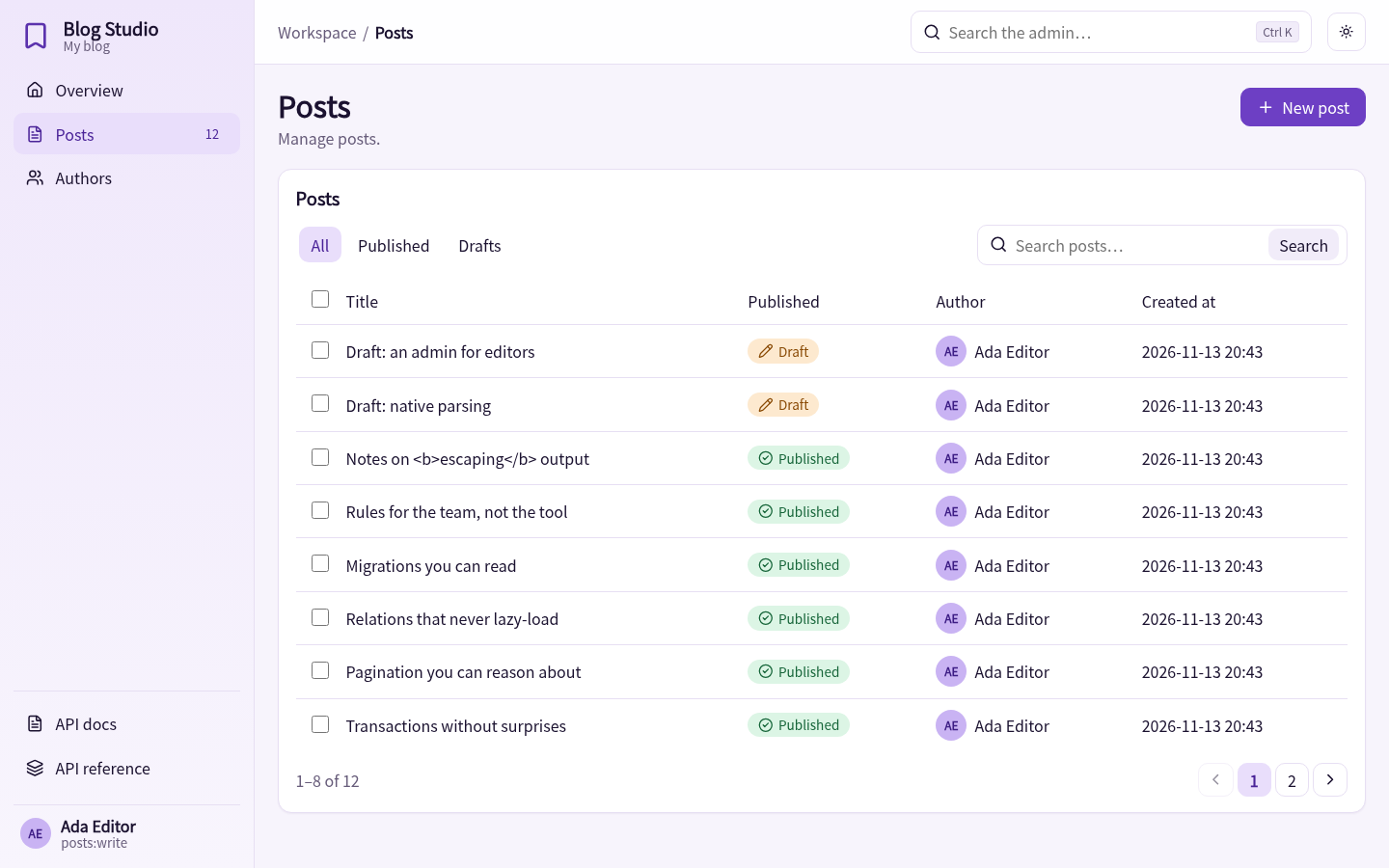
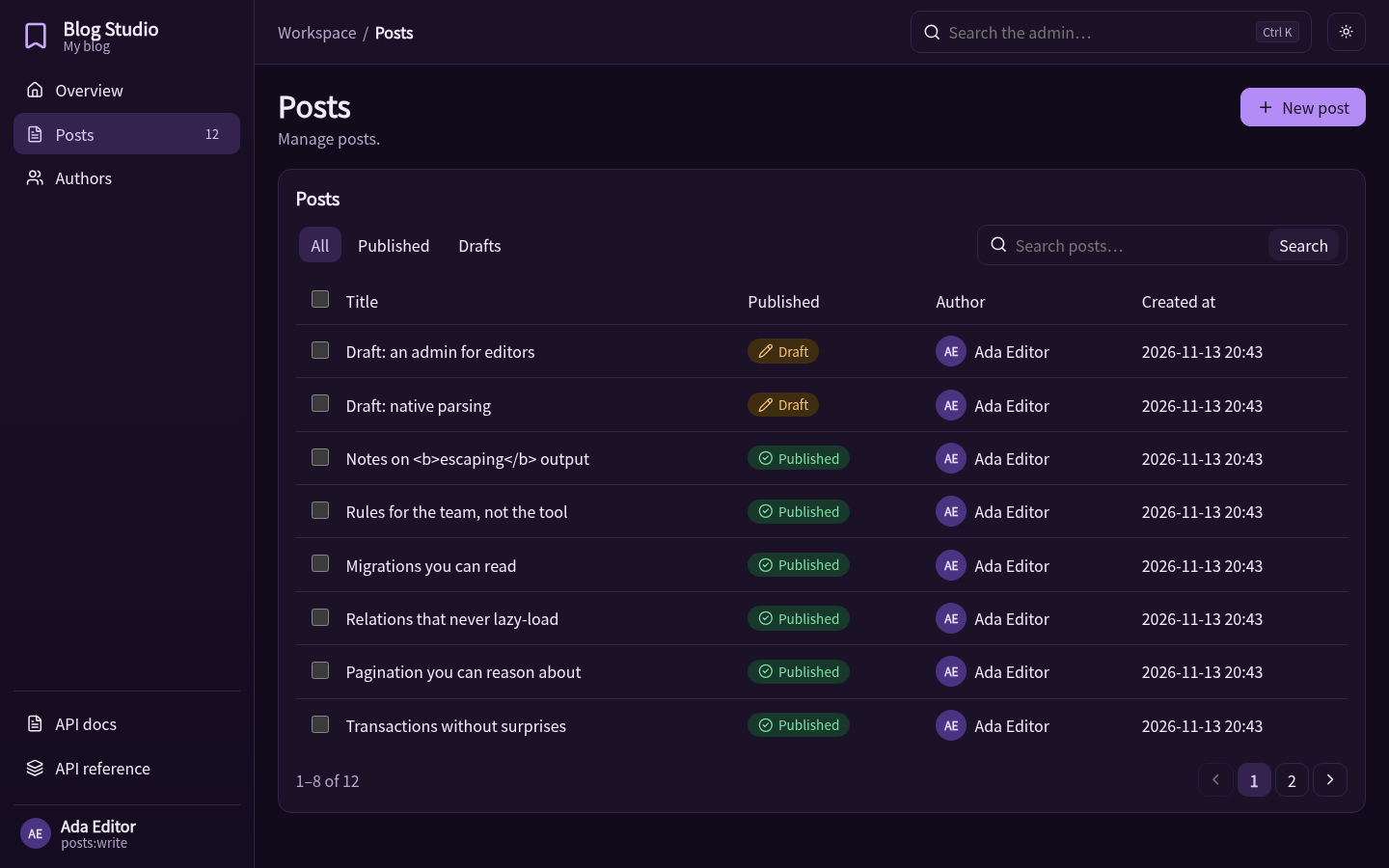
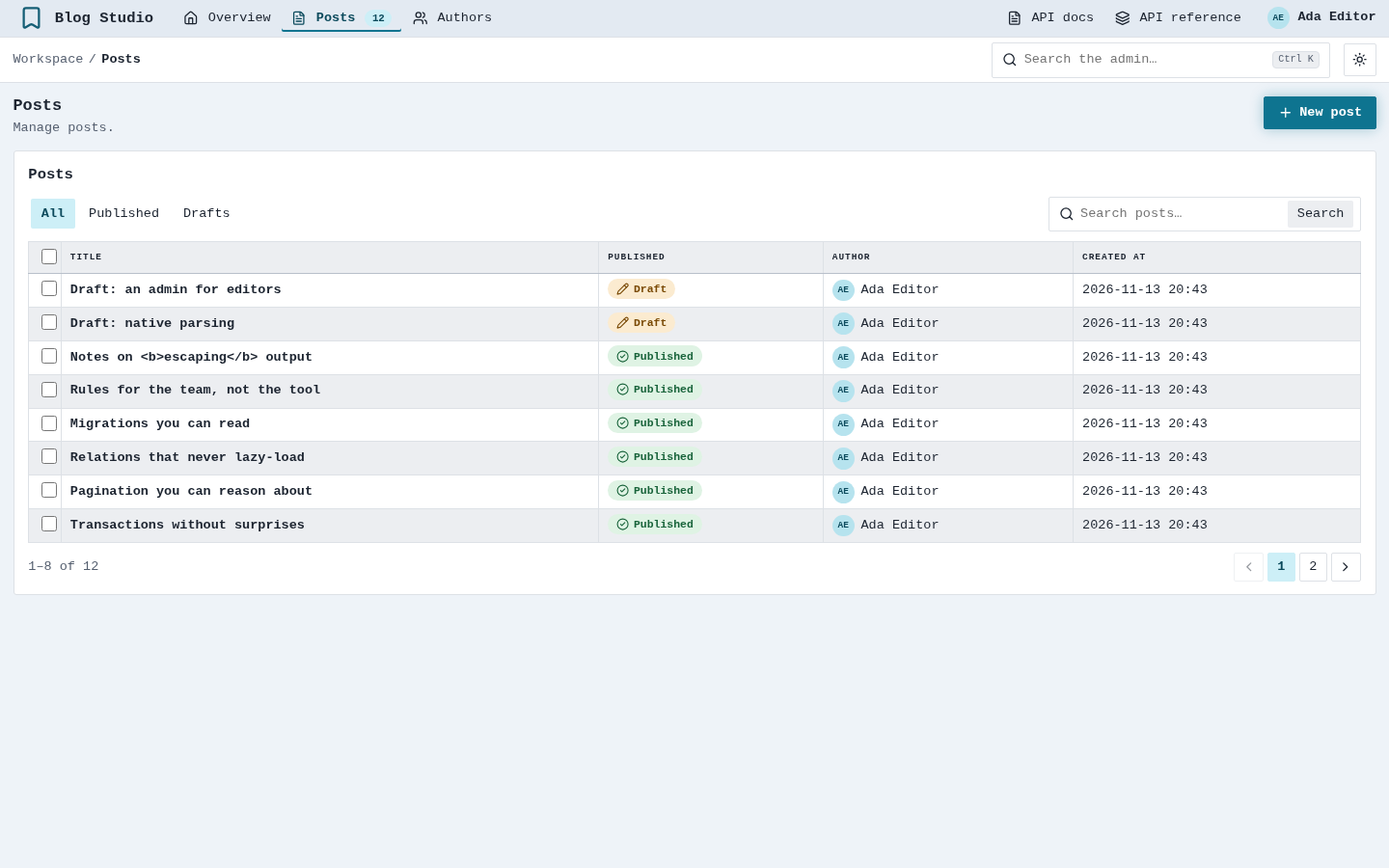
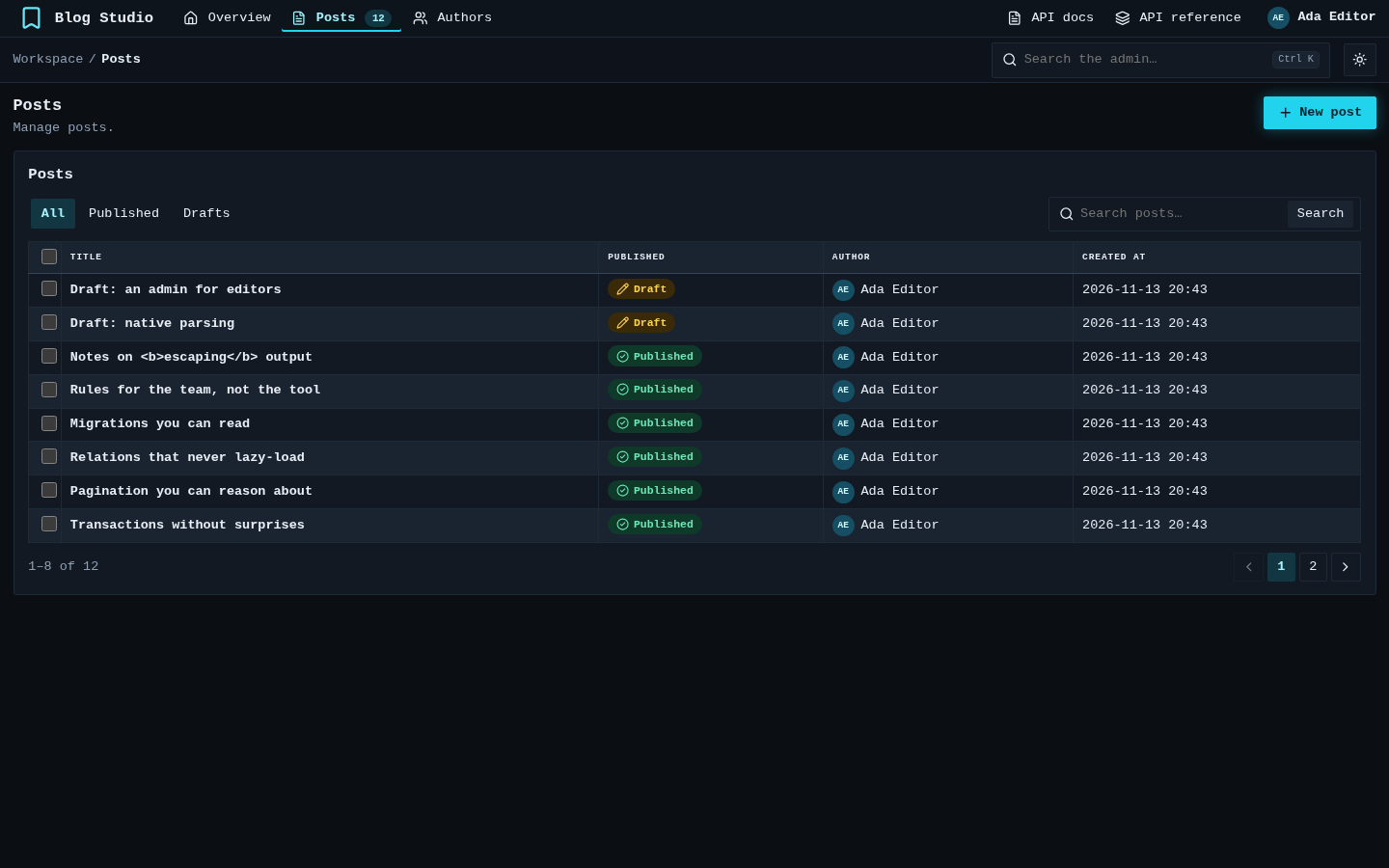
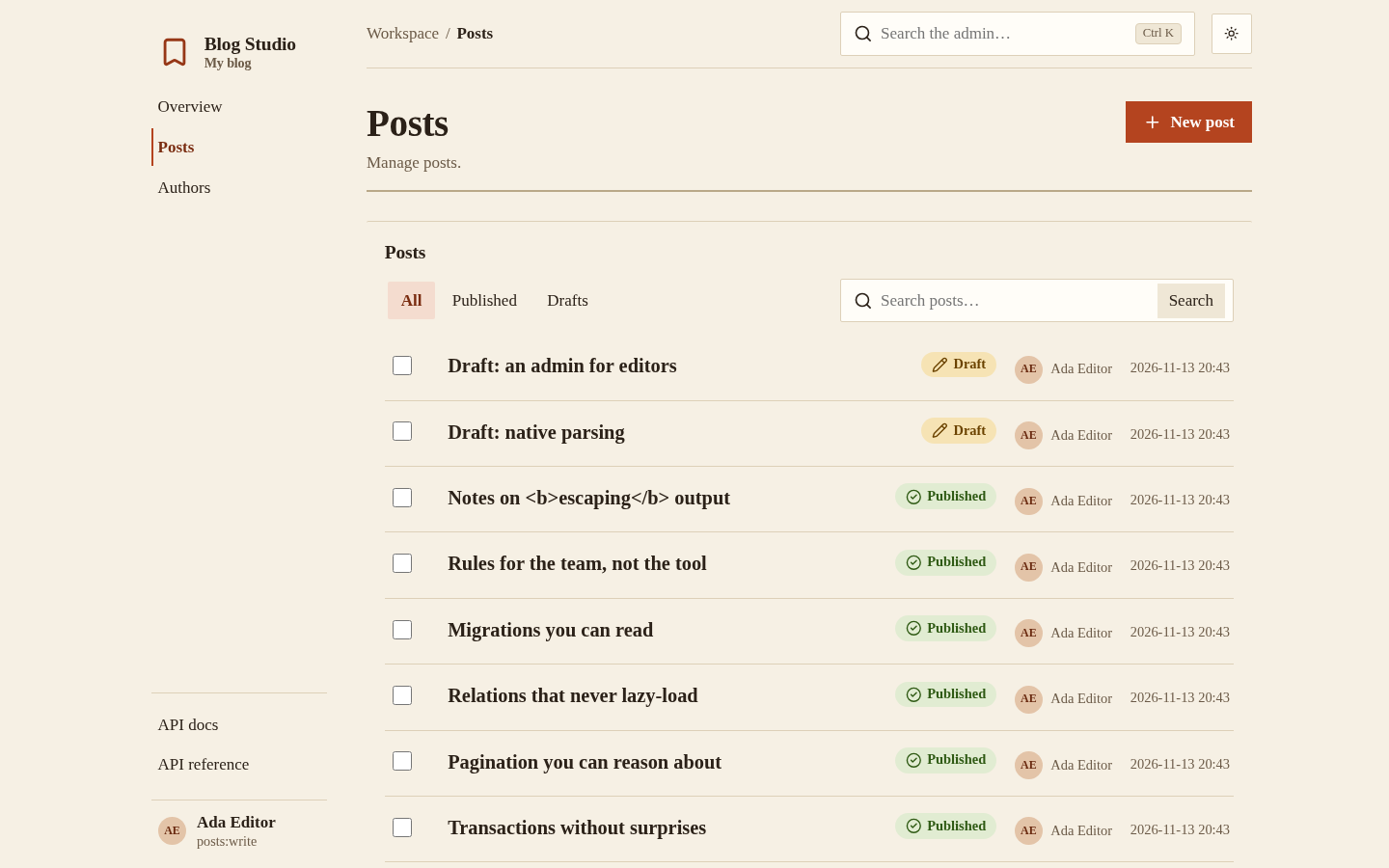
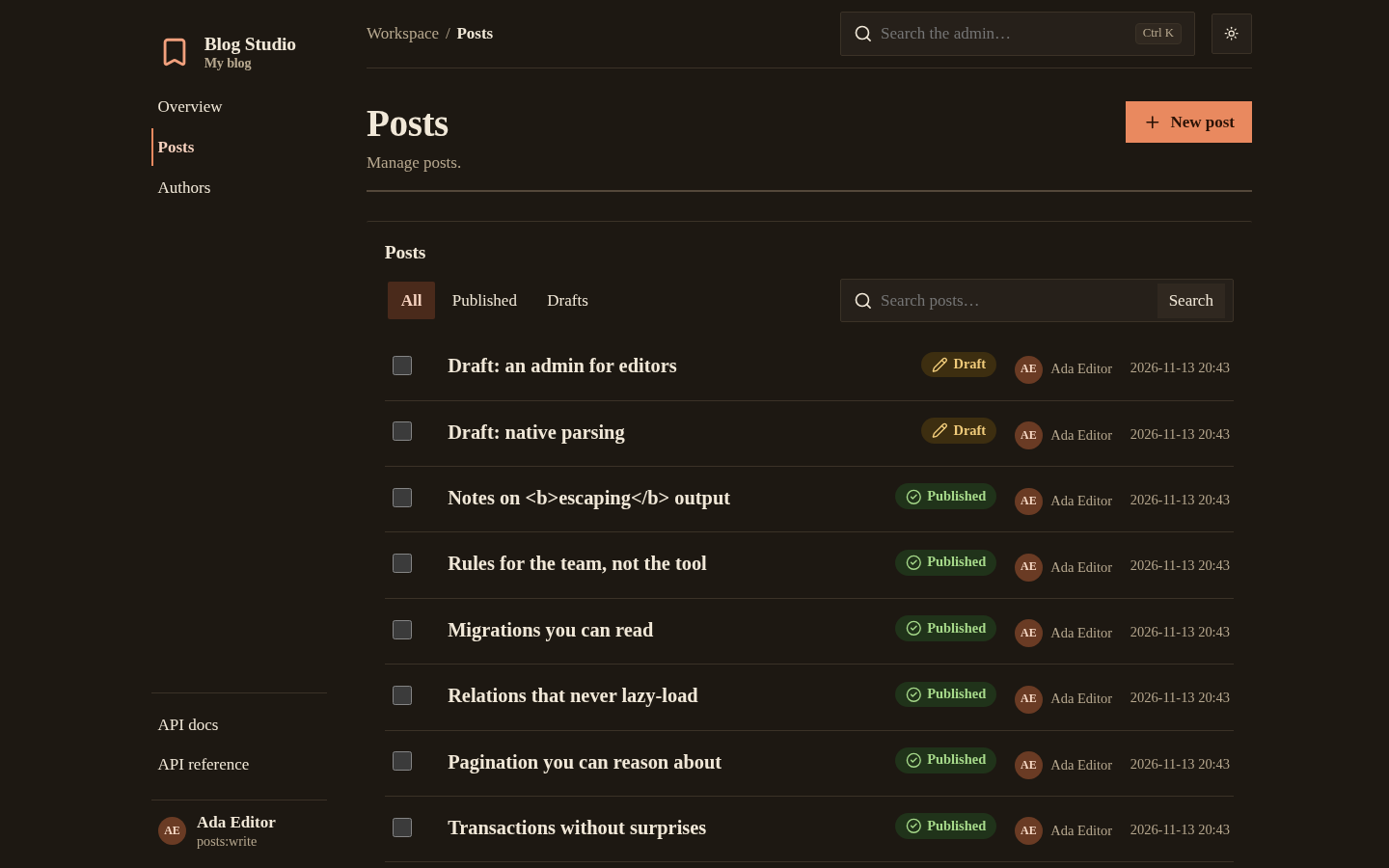
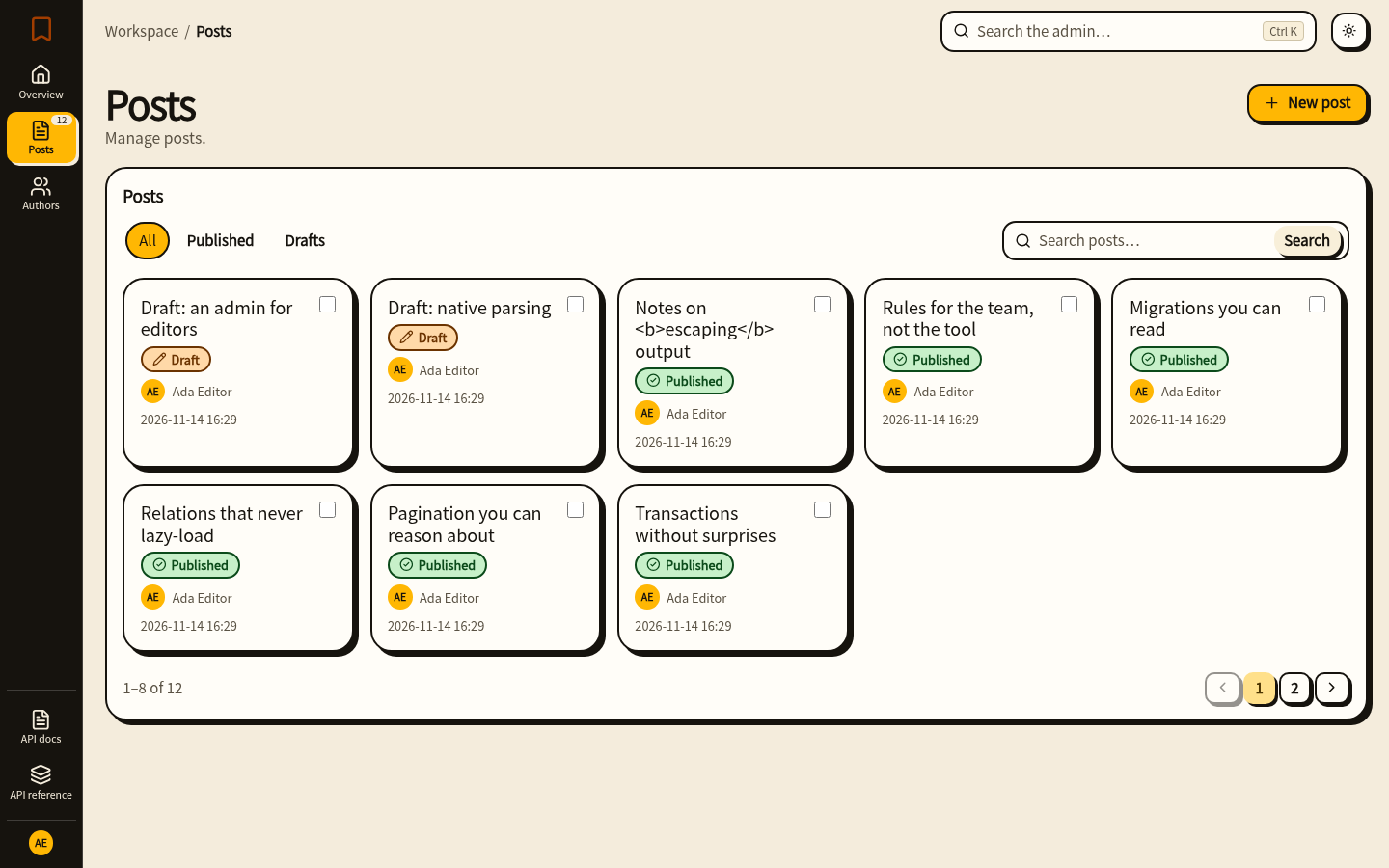
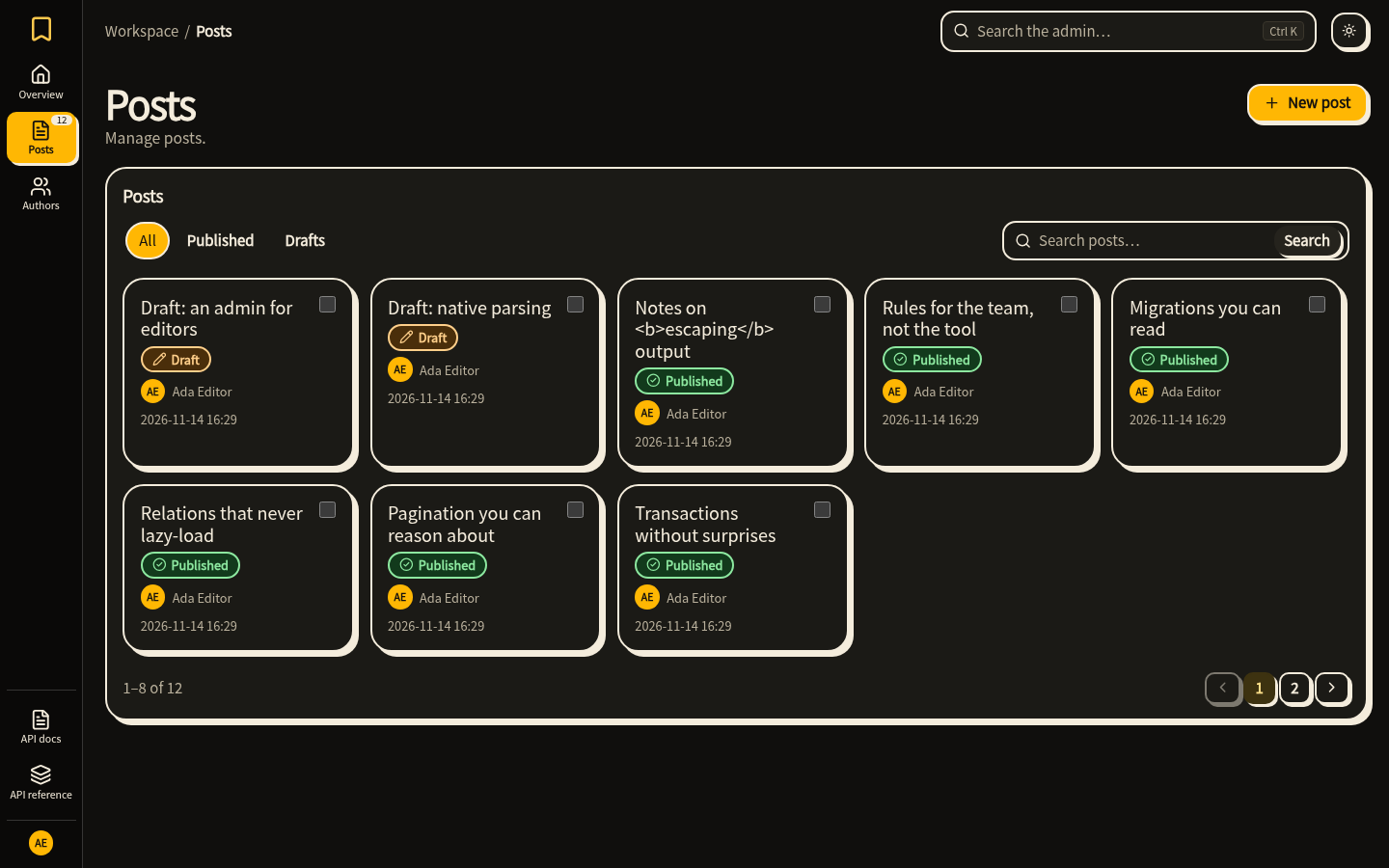
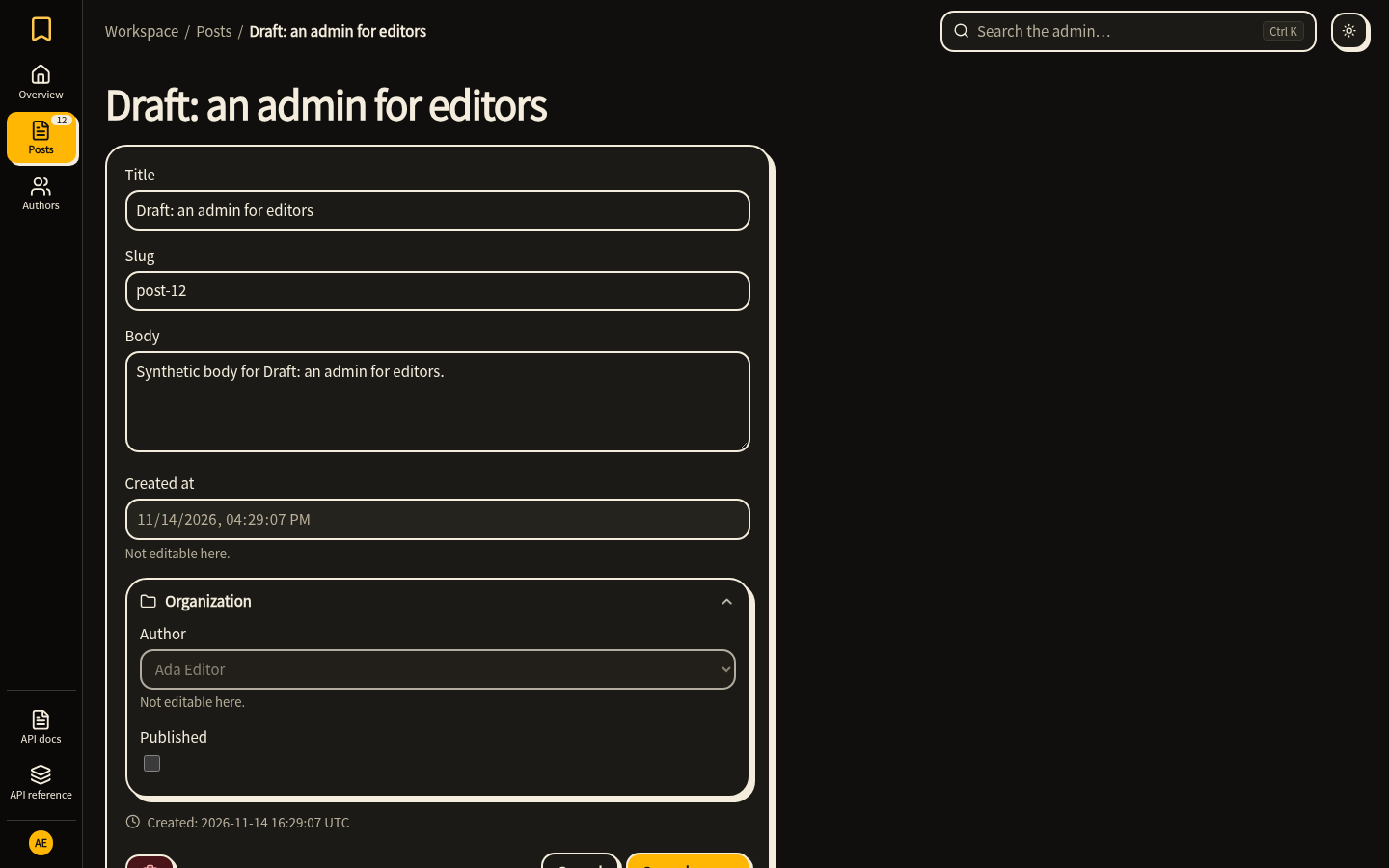
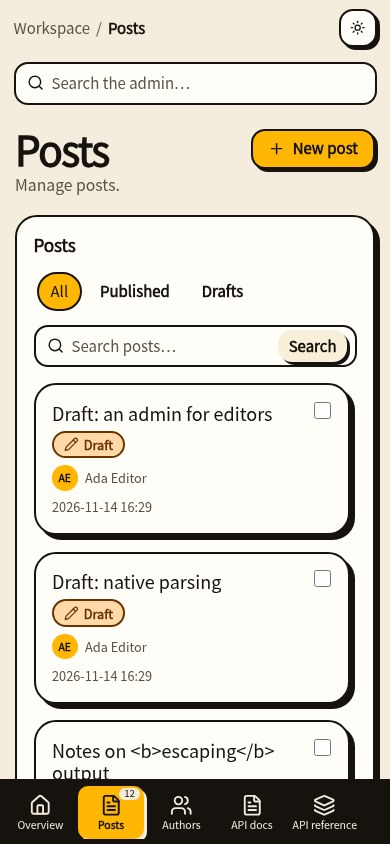
Pick one with Admin(theme="bento"), or build your own: a Theme is a set of --hn-* design tokens for the two schemes plus a layout (sidebar, topbar, index, rail) and a list_style (table, rows, cards). The text and surface colour pairs of every built-in theme are tested against WCAG AA contrast. Bento's pages were checked in Chromium and Firefox at 1440, 390, 360 and 320 px; WebKit was not run.
Mounting under a prefix
Include the admin under a Mount to choose where it lives: Hinoki(include=[Mount("/ops", admin)]) serves it at /ops, and its links, assets and the CSRF cookie path use that address. Without a Mount the admin is at /admin. Admin(prefix="/staff") adds a path of its own after the mount (/ops/staff). Including admin.api() instead keeps the prefix it was built with.